As autonomous AI agents begin to take on more complex tasks, a new technical challenge has emerged: how do humans effectively monitor and manage machines that are working on their behalf?
While traditional remote desktop software is designed for IT support or office work, Astropad has launched Workbench, a solution specifically engineered to bridge the gap between human operators and autonomous AI agents.
The Rise of the “Agentic” Mac Mini
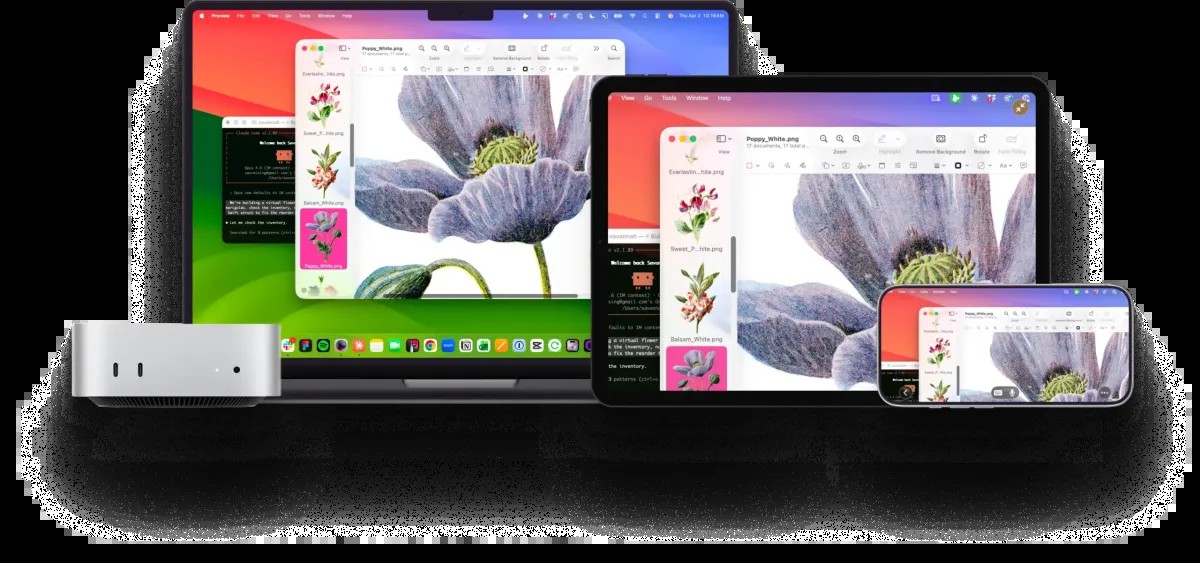
There is a growing trend of using compact, powerful hardware—most notably the Apple Mac Mini —as dedicated “brains” for AI agents like OpenClaw. Because these agents can run long, autonomous processes, users need a way to check in on them without being tethered to a desk.
Currently, developers often rely on limited tools like terminal commands or Telegram bots to monitor progress. However, these methods lack the visual context necessary for complex tasks. Astropad Workbench aims to fill this void by providing a high-fidelity visual window into the agent’s workspace.
Key Features of Astropad Workbench
Unlike standard remote desktop tools built for enterprise IT, Workbench focuses on the fluid, interactive needs of AI orchestration:
- High-Fidelity Visuals: Utilizing Astropad’s proprietary LIQUID protocol, the software offers low-latency, high-resolution streaming. This is crucial for users who need to visually inspect designs, mock-ups, or data outputs generated by an AI.
- Voice-Driven Command: In a departure from traditional mouse-and-keyboard setups, Workbench integrates Apple’s voice models. This allows users to dictate prompts and commands directly to their agents via their mobile device.
- Mobile Orchestration: With dedicated clients for iPad and iPhone, users can monitor logs, approve dialogue boxes, or restart stalled tasks from anywhere, effectively putting “agent management” in their pockets.
- Multi-Device Management: A built-in device chooser allows operators to switch seamlessly between multiple Macs running different agents.
Bridging the Gap Between Automation and Oversight
The core problem Workbench addresses is the “black box” nature of AI. An agent might be performing a task perfectly, or it might be stuck in a loop or facing a prompt it cannot resolve.
“There are times you’ve got to see what’s happening on your Mac. You’ve got to approve a dialog or save something, or just visually see what’s happening.” — Matt Ronge, CEO of Astropad
By providing a visual and vocal interface, Astropad is moving away from the “remote support” model (fixing a broken computer) toward a “remote supervision” model (managing a digital worker).
Availability and Pricing
Astropad, a long-standing player in the creative professional space, is positioning Workbench to capture both individual AI enthusiasts and businesses looking to boost productivity through automation.
- Platform Support: Currently available for macOS 15+ and iOS. Plans for Windows and Linux support are in development.
- Pricing Model:
- Free Tier: Includes 20 minutes of access per day.
- Premium Tier: $10 per month or $50 per year for unlimited access.
Conclusion: As AI agents transition from simple chatbots to autonomous workers, the need for specialized management tools will grow. Astropad Workbench represents a shift in remote computing, moving from repairing machines to supervising digital intelligence.