VeraCrypt has established itself as the gold standard for data encryption. This is more than just a utility. It is a robust, free, open source protection for your digital life. Born from the ashes of TrueCrypt, it continues the legacy that defines modern disk encryption tools. Additional protection is now available for everything from individual files to entire system partitions. In an age where cyber threats are everywhere, controlling your data is no longer a luxury. This is a must have.
This software acts as a strong barrier against unauthorized use. It uses battle-tested algorithms like AES, Serpent, and Twofish to further complicate things for attackers. These encryption methods work even against brute force attacks. But the real advantage of VeraCrypt is its transparency. Since the code is open source, it can be reviewed by experts around the world. They can spot vulnerabilities and propose fixes. This collective evaluation creates a level of trust that proprietary software cannot match. You aren’t just buying a tool; You are joining a community dedicated to ensuring strict security.
Why VeraCrypt is your first choice for data protection
You might wonder why you would choose this solution over a built-in solution like BitLocker. The answer is flexibility and independence. VeraCrypt does not lock users into any particular ecosystem. It runs on Windows, macOS and Linux and has a consistent user interface. Whether you are an expert protecting business secrets or a student protecting a thesis, the experience is the same. It supports portable mode, too. This means you can run it directly from a USB drive without having to install anything on the host computer.
The software also introduces a cinematic feature: plausible deniability. This allows you to create hidden volumes inside encrypted containers. If you need to reveal your password, you can present it as a lure. The person who forced this question cannot see the hidden information. It’s a desperate-measure feature, but it highlights how serious the software is about physical security. Customize encryption algorithms, set password backup frequency, and precisely manage keys. Suitable for both beginners and crypto veterans.
Installation and cross-platform compatibility
Getting started is easy, but you need to be careful where you download it. Always use official sources or reliable repositories like the Futura software library. Integrity checks are non-negotiable. Check the digital signature and hash before running the installer. This prevents you from installing a modified and malicious version.
The installation process is similar for major operating systems. In Windows, you can choose between a regular installer or a portable version. Portable options are great for travel or restricted environments where you don’t have administrative rights. Windows 10 and 11 are fully supported, as well as older systems such as Windows 7, 8 and even XP. macOS users can enjoy the same convenience as the latest versions of the operating system guarantee full encryption. Linux distributions benefit from package maintainers who keep software up to date with little effort.
However, things have changed on mobile devices. VeraCrypt is not yet officially available for Android or iOS. Why? The technical limitations of mobile operating systems (sandboxing, battery management, kernel-level access) make it difficult to safely implement native encryption. Developers have not yet addressed these specific obstacles. You may find third-party apps that claim to read VeraCrypt volumes on your phone, but they are not officially verified. They may not offer the same security guarantees. For true peace of mind, stick to desktops and laptops.
The Importance of Staying Updated
Security is not a one-time setup. This is an ongoing process. VeraCrypt regularly releases updates to fix vulnerabilities and improve performance. Older versions may rely on weak algorithms or contain known vulnerabilities. Always check for the latest version. Developers are proactive and change code quickly to respond to new threats. This commitment to maintenance keeps the tool viable in a rapidly changing threat environment.
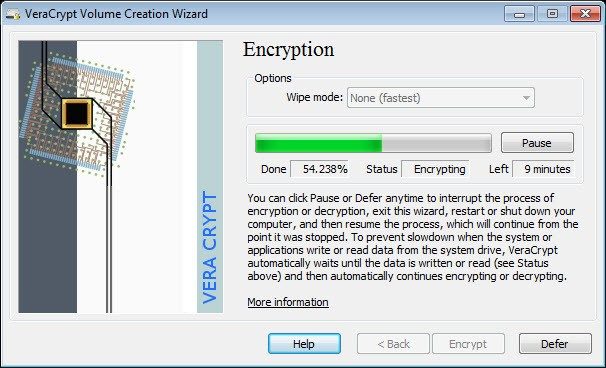
You can transport encrypted volumes between computers without losing compatibility. This portability is important for users who need constant access to data in different environments. This software guides you through every step, from creating virtual volumes to protecting the USB stick. This does not require you to be an expert in cryptography. The user interface is for illustrative purposes only. Explain what you are doing and reduce the possibility of user errors.
“VeraCrypt goes beyond simple file encryption; it offers plausible deniability, customizable algorithms, and advanced key management.”
For those who value digital privacy, the choice is clear. You get a tool that respects your autonomy. It doesn’t phone home. It doesn’t track your behavior. It’s just encryption. The trade-off is a slight learning curve compared to simpler, locked-down solutions. But the control you get is worth it. Decide who can see your information. You decide how strong the lock is. In a world filled with opaque algorithms and hidden agendas, this kind of control is invaluable.
For some, the mobile divide is still a bit frustrating. You can’t easily unlock a VeraCrypt volume on your phone with the same native ease. But until developers close the technological gap, the desktop will remain a fortress. And for most users, that is where the heavy lifting happens anyway. The software handles the complex calculations, so you don’t have to. All you have to do is remember your password. Or do you? The risk is always there. Drive encryption does not eliminate weak passwords, phishing, or hardware theft. VeraCrypt raises the bar. This does not eliminate the need for caution. However, if you are careful, you can rest assured that your data is still yours.
VeraCrypt offers more than just a free tier. It offers everything. There is no premium version. There is no student discount. There are no paywalls hidden behind advanced encryption tools. This is open source in its purest form. Security equality is built into the code. Whether you’re a student, a corporate IT manager, or a privacy advocate, all the features are at your disposal. Any updates? It’s completely free. They roll out patches for vulnerabilities and adapt to new security standards. The community drives marketing departments, drive these changes.
Getting Started: Installation and Interface
Downloading is easy. Visit the official website. Your package manager works too. Select the version corresponding to your operating system. Follow the installation wizard. Sites like Futura-sciences can host your files safely, but be sure to check the source.
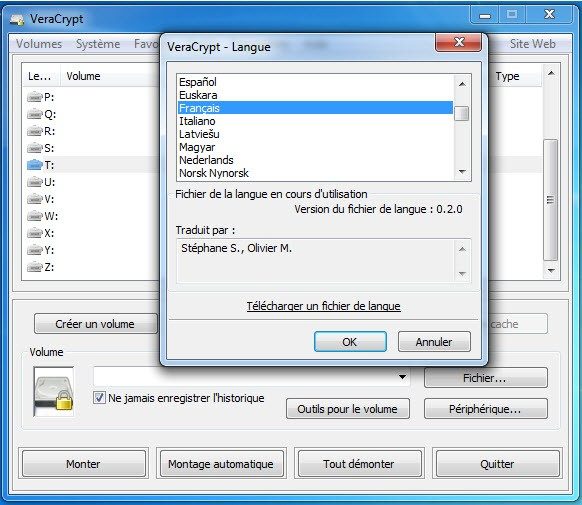
The user interface is deceptively simple. Click some buttons. Suddenly an encrypted volume is created. It handles the heavy lifting. Automatic mounting can be configured. Or keep it manual for added security. Set your password. Set the size. Choose an encryption algorithm.
If you’re stuck, you’re not alone. The documentation is very comprehensive. Online tutorials are very easy to understand. The community is active and helpful. You’ll find instructions for everything from creating a basic volume to managing recovery keys. Some cybersecurity courses include VeraCrypt in their practical modules. Learning it does not require a formal certificate. The resources are there.
Versioning and compatibility
Software ages. Legacy systems linger. VeraCrypt knows this. You can download older versions if your hardware or software environment requires it. This flexibility is important. Old machines don’t disappear overnight.
However, use the latest version whenever possible. Security patches are important. Good news? Forward compatibility is standard. Volumes created with older versions can usually be opened with newer versions. Integrity is maintained. You can check for updates by going to the Help menu. Or use the version check function. Always install from official sources to avoid tampering.
VeraCrypt vs. The Competition
Encryption is crowded. BitLocker exists. However, this is limited to certain versions of Windows. VeraCrypt is everywhere. Linux. macOS. Windows. No additional costs are required. There are no restrictions on the operating system.
Compare this to AES Crypt or AxCrypt. These are user friendly. The same goes for VeraCrypt. But it goes further. It offers hidden volumes. Plausible deniability. Features rarely found anywhere else. It’s not just about hiding data. It’s about denying of its existence.
This flexibility enables advanced use cases. IT professionals use it to deploy it for strict data protection strategies. Journalists use this to safeguard sources. Lawyers protect client privilege. It fits niche needs perfectly.
Cloud Integration and System Security
Connect VeraCrypt with cloud sync tools like Dropbox and Nextcloud. Encrypt the folders locally. Files are transferred encrypted. No leaks during transfer. This adds an extra layer of security to your cloud storage.
Full disk encryption is another killer feature. Blocks physical attacks. If the laptop is stolen, the drive is useless without the key. This is very important for mobile devices.
External drives also have their advantages. USB sticks. SD card. Portable hard drives. Encrypted for long-term archiving. Or just for occasional secure transfers. The software handles both scenarios.
For organizations, scale is manageable. Integrate it into access management procedures. Regulate backups. Secure exchanges between teams. Open source allows for deep customization. Technical documentation supports complex deployments.
The Verdict
VeraCrypt is more than just a tool. It’s a standard. Balances power and accessibility. It’s reliable. And because it’s open source, it evolves as the threat landscape changes.
This is a solid choice for anyone who takes privacy seriously. Individuals. Companies. Activist. The math backs it up. The community supports it. The code is transparent.
Always add another layer. Another adjustable setting. The more you dig, the more you realize how much control you have. That’s the point.
The Technical Breakdown of VeraCrypt
Let’s stop talking about marketing nonsense and see what’s really going on behind the scenes. VeraCrypt is more than just a lockbox application. It’s a mature OTFE encryption suite built by IDRIX, the team that kept the TrueCrypt torch burning even after the original project failed. The code is open source and licensed under Apache 2.0, but some legacy TrueCrypt terms apply. This transparency is key. Binaries can be inspected. You can check the hash value. If you don’t trust the code, don’t use it.
The software works on Windows, macOS and Linux. No internet connection is required to encrypt the drive. You just need to download the first installer from the web or check for updates. For those who cannot or do not intend to install the software on their work machine, there is a portable mode. You can copy the executable file to a USB drive and run it directly. No registry editing. Administrator rights are not required (in most cases). Leaves a minimal footprint on the host system.
How VeraCrypt encryption works
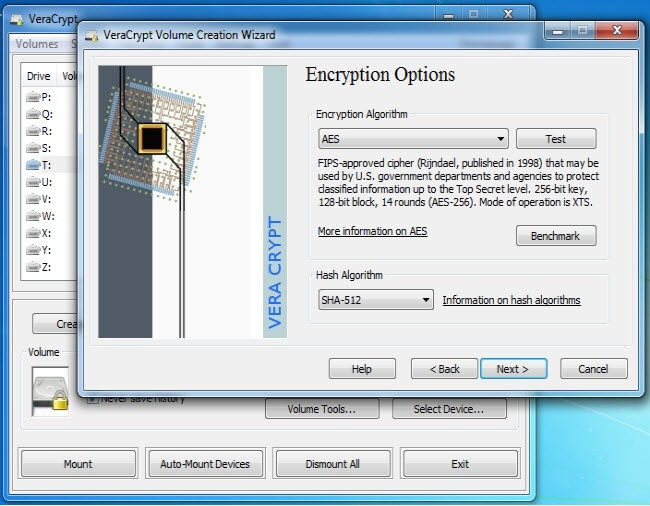
The core engine relies on proven cryptographic primitives. We didn’t invent a new algorithm. Rather, they used codes that had stood the scrutiny of cryptographers for years. You can get AES, Serpent and Twofish. These can be used individually or in cascade. AES-Twofish-Serpent is the default cascade and combines the best of all three. This is a little overwhelming for most casual users, but it’s a solid defense-in-depth strategy.
The operating mode is XTS. This is important. XTS is designed for disk encryption. This prevents an attacker from swapping data blocks to obfuscate the decryption process. Standard modes such as CBC and ECB are vulnerable to block permutation attacks. XTS maps each block to a location on disk. Move the block, and the decryption fails. This is a small detail, but it can have a significant impact on the integrity of information security.
Hardware acceleration is also important. Modern processors include AES-NI instructions. VeraCrypt detects and uses these. In terms of performance, encryption becomes almost free. There are no delays in saving files to encrypted volumes. It works on older hardware without AES-NI, but you will notice some CPU overhead.
Key derivation and authentication
The most efficient algorithm is useless if the key is weak. VeraCrypt does more than just hashing passwords. It is done through the key derivation function. Default is PBKDF2 and HMAC using SHA-512. You can also use SHA-256, Whirlpool or Streebog. If you are working with older volumes, there is also support for RIPEMD-160. The focus is on the number of repetitions. By default, the hash function is performed thousands of times. This slows brute attacks. If you want to guess a password, you can’t do it millions of times a second. Each guess takes a considerable amount of time.
It has an extra layer. You can use the key file. These are binary files (from photos to system logs) that are used as part of the encryption key. This file is required to unlock the volume. When files are lost, so is the data. This is good for backing up passwords, but it won’t replace them.
Then there is PIM. Personal Iterations Multiplier. This is the number you enter when unlocking. The number of iterations is multiplied. Entering a high PIM value makes it harder to brute force the volume and harder to recover if you forget your password. It’s a trade-off. Use this if you have a strong password but want more paranoia. If you’re relying on a password manager that can automatically send false values, don’t use it.
Hidden volumes and system encryption
A distinctive feature of VeraCrypt is hidden volumes. Create an encrypted volume. Embed fake information. Next, create another encrypted volume in unused space. External volume sounds like random noise. If someone forces you to reveal your password, you give them the outer one. They are looking at the decoy data. The internal volume remains mathematically invisible. Without the inner password, its existence cannot be proven.
This requires careful planning. You cannot exceed the space allocated for the hidden volume. Filling the outer volume to 90% may leave no room for hidden volumes. Even worse, overwriting the hidden volume can corrupt the hidden data.
I noticed that your post does not include the text of the source article. The actual content of Section 4 is required to complete the requested rewrite.
Paste the text of the article here. Immediate rewrites under strict SEO, style and formatting guidelines.