
Building a house without a blueprint is a recipe for disaster. You can’t just guess where the load-bearing walls go or how to route plumbing behind drywall. You need a plan. The same logic applies to the digital world.
Think about launching an online clothing store. You have products, customer data, and marketing copy. Where does the catalog live? How do users find the returns policy? If you scatter these elements randomly, shoppers will bounce. They won’t find what they need.
This is the core problem that information architecture solves.
The term gets thrown around loosely. Some people equate it with web design. Others think it’s just database management. It’s neither. It’s the structural engineering of content.
According to various industry definitions, information architecture is the model of a system of information. It describes the rules for organizing, interlinking, accessing, and presenting data. It is also the art and science of creating and maintaining that model.
For a growing corporation, this isn’t just about a homepage. It covers marketing materials, customer databases, and user documentation. It’s the skeleton that holds the flesh of the brand together.
Why Information Architecture Matters
Consider an online shoe store.
The information system is the store itself. The products are the shoes. But the information architecture is the logic behind the store. It defines the sizing system. It categorizes colors. It tracks stock levels. It sets pricing structures.
Without this structure, the store is chaos. A user clicks “Red Shoes” and gets black boots. They click “Size 10” and see nothing. They leave.
Good IA ensures that information is accessible. It makes complex data simple. It aligns with user intent. It predicts what a user wants before they ask for it.
The Roots of the Field
The concept isn’t new. Architects have been organizing spatial data for centuries. But applying it to digital information is a recent evolution.
Early web designers focused on visuals. Pretty pages. Flashy banners. But pretty pages don’t help users navigate complex sites. As the web grew, so did the need for structure.
Enter the architects of the web. They realized that content needed a framework. A hierarchy. A taxonomy.
The term “information architecture” was coined in the 1970s by Richard Saul Wurman, an architect. He applied building principles to information. The web adopted this mindset in the 1990s.
Today, IA is a distinct discipline. It bridges design, psychology, and computer science.
What Information Architecture Actually Includes
IA isn’t one thing. It’s a collection of techniques and tools.
It includes:
- Taxonomy : Creating categories and tags.
- Navigation : Designing menus and pathways.
- Search : Optimizing how users query data.
- Metadata : Adding descriptive tags to content.
Each piece serves a purpose. Taxonomy groups similar items. Navigation guides users to them. Search lets them find specific items. Metadata makes it all machine-readable.
The Human Element
Software helps, but it doesn’t replace IA. Tools can organize data. They can’t decide what that data means.
Who is the user? What do they need? What context are they in?
IA answers these questions. It’s user-centric. It’s not about what the company wants to say. It’s about what the user needs to find.
Looking Ahead
The field continues to evolve. With AI and machine learning, IA is becoming more dynamic. Recommendations are smarter. Search is more intuitive.
But the core principle remains. Structure matters. Chaos repels.
We’ll explore the history of IA in more detail next. We’ll look at the key concepts that define the field. And we’ll examine the software that brings it to life.
For

We didn’t invent the need to sort things out. We’ve been doing it for thousands of years. The Library of Alexandria had a 120-scroll bibliography back in 330 B.C. Centuries later, we built the Dewey Decimal System and the Library of Congress Classification because paper piles got too big. You probably used outlines in school. The goal was always the same: make sure you could find the thing you were looking for.
Then came the internet.
Suddenly, the rate of publication exploded. We weren’t just adding books to shelves; we were adding data points to a global network every second. Digital formats made cross-referencing trivial. Click a link. Be somewhere else. The power of this flexibility is undeniable. But it created a new problem.
Keeping everything organized now feels less like a chore and more like an impossible task. The sheer volume is overwhelming.
In 1976, Richard Saul Wurman coined a term to help us cope. He was at an American Institute of Architects conference. He’s better known now for co-creating the TED conferences. Wurman noticed a gap in how we talked about data. He disliked “information design” because it focused on aesthetics. It described how information looked. It didn’t describe how we accessed it.
He needed a word that captured the systematic approach to how systems of information actually work. He called it information architecture. He published a book on the concept in 1997, but the idea had taken root years earlier.
Defining the Scope of Information Architecture
The term is often confused with other disciplines. You might hear usability engineering, content management, content strategy, user experience (UX) design and interaction design (IxD) thrown around as synonyms. They aren’t.
These are related fields. They touch specific areas within IA. Or they refer to the specific technology used to build the system. A website is a technology. UX is a design philosophy. Information architecture is the backbone. It’s the structure. It’s the map.
We have the history. We have the definition. It’s difficult to pin down, sure. But it’s essential. We need it because the universe of information keeps expanding.
Why Do We Need Information Architecture?

Think about how you organize your bookshelf. You don’t mix every possible rule at once. You pick one primary system. Maybe it’s author last name. Maybe it’s title. Or perhaps you group them by height, though that’s usually a losing strategy. If you try to combine methods, one has to dominate. Author first, then title for the duplicates.
How do you choose? You optimize for retrieval. In a massive research library, patrons aren’t hunting by author. They’re hunting by subject. If you organize by author in that context, you’ve created friction.
Digital information is more complex than books, but the goal remains the same. You need to make access easier. But here’s the catch: an arrangement that speeds up discovery for one group of users might slow down or even block another group.
The Cost of Poor Organization
We are drowning in digital content. The volume is growing daily. Without a solid structure, people can’t find what they need when they need it.
Good information architecture (IA) isn’t just about tidy menus. It’s about efficiency. A business with optimal IA reduces operational costs. Employees spend less time digging for files. They spend less time recreating documents because they couldn’t find the original. That’s money saved.
The financial upside can be staggering. Consider the case studied by Jared Spool in 2009. A team adjusted the login placement on a major e-commerce site. It was a subtle shift in IA. Returning customers could log in before browsing. The experience smoothed out. They spent more. New customers didn’t have to register before buying. Friction vanished.
The result? Online sales jumped by roughly $300 million in a single year. The change started showing significant lifts in just the first week. All because they moved a form.
Core Concepts to Master
So, how do you start? Information architecture is a massive field. Before diving into tools or software, you need to grasp the foundational concepts. These are the mental models that dictate how users interact with your digital space.
The Polar Bear Book and Its Framework
Rosenfeld and Morville defined the field in their famous guide, colloquially known as the polar bear book because of the animal on its O’Reilly cover. This isn’t just a cute detail. It’s the text most IA professionals cite when defining the discipline.
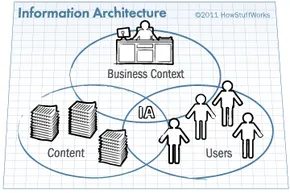
The 2002 edition breaks IA into three overlapping circles: content, users, and context. Content is the raw material—text, data, images, video. Users are the people hunting for that stuff, including how they think and search. Context is the environment—budgets, tech stacks, corporate politics, goals. You can’t design for users without knowing the constraints.
The Basic Unit: The Package
Gary Marchionini, dean of UNC’s School of Information and Library Science, stripped it down further. At his presentation, he called the basic unit of IA a package. It’s a paragraph. An image. A video. A discrete chunk of data.
IA isn’t just about arranging these chunks. It’s about planning how they’re managed, accessed, and linked inside a larger system. We’ll stick with Marchionini’s term here. It’s cleaner than “entity” or “object.”
Attributes and Logic
Everything in a package needs labels. These are attributes. Think of them as metadata descriptors. Height. Weight. Gender. For digital info, attributes might be physical (like character count in a paragraph) or abstract (like the correct context for displaying that text).
If the IA doesn’t apply these consistently, the system breaks. Chaos ensues. Attributes need rules. Logic. How does attribute A relate to attribute B? Without that structure, search fails. Navigation fails.
The Four Components of IA
Abstract concepts are useless without execution. Rosenfeld and Morville outlined four specific components architects use to capture those ideas.
- Organization systems. This is how we categorize information. Author names. Titles. Shoe size. Fabric type. Color. It’s the taxonomy.
- Labeling systems. How do we represent that category? Do we say “optometrist” or “eye doctor”? It depends on the audience’s literacy and expectation. Precision isn’t always clarity.
- Navigation systems. How do humans move between pieces of content? The “Next” button. The tab bar. The sidebar. It’s the path.
- Searching systems. How do users find what they’re looking for when they don’t know the path? Keyword entry. Scanning numbered lists. Filtering. It’s the emergency exit.
The Technical Reality
These components don’t exist in a vacuum. They live inside technology. If you’re using a database, you need querying components to retrieve specific records. If you’re building a website, you’re dealing with browsing, scrolling, clicking. The IA must account for the mechanics of access.
The Jack-of-All-Trades Architect
The scale of this job is massive. An information architect can’t just draw diagrams. They need to know the rules.
Think of a traditional architect. They can’t ignore building codes. They need to understand structural standards so the house doesn’t collapse and passes inspection. An IA needs the same depth. They must understand industry standards for creating, storing, accessing, and presenting digital info.
That means knowing Unified Modeling Language (UML). HTML. CSS. JavaScript. It’s not always about coding, but you can’t design what you don’t understand.
Controlled vocabularies are non-negotiable. Metadata must be precise. Every label needs to mean exactly one thing. If “Red” means two different colors in two different departments, the system is broken.
Designing the Structure
The next step is execution. Theory ends here.
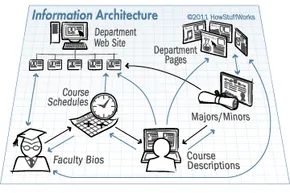
Documentation is the anchor of any successful information architecture (IA). Without it, the structure is just a thought experiment. Architects create a written record of their designs, much like engineers drawing blueprints for a skyscraper. This ensures every developer and maintainer knows the rules. It also serves as the primary reference for future updates. If the original plan is lost, the system drifts.
The documentation itself is detailed. It includes descriptions of content packages and their specific attributes. Diagrams show how these packages relate. Flowcharts map user decisions, tracing the path from one choice to another. Then there are wireframes. These are the skeletal models of web pages that dictate how information appears to the user.
When approval is needed, presentations matter. Architects might build slide decks to pitch new designs to managers or boards. But the process starts messier. Brainstorming happens on paper. Sticky notes clutter whiteboards. It is chaotic. As the concept solidifies, architects switch to modeling software. Tools like Visio, OmniGraffle, or Dia help create clean flowcharts and tree structures. These visuals often end up in the final documentation, polished with desktop publishing tools like Adobe Illustrator.
Tools for Testing and Modeling
Design requires validation. Architects don’t just guess; they use specialized software to test their hypotheses before writing a single line of code. This modeling phase helps identify flaws early.
Several tools dominate this space:
- Optimal Sort analyzes how users interact with information. It helps architects choose the best categories and labels by observing the user experience (UX) directly.
- Treejack focuses on navigation. It simulates how users click through pages to find where they get lost or stuck.
- Axure RP is a prototyping tool. It builds interactive wireframe models of websites, allowing teams to test functionality without backend development.
- Morae records and tests existing sites. It provides deep insights into the user experience, highlighting friction points that need IA improvements.
Once the design is validated, it’s time for implementation. This is where theory meets reality.
Putting Information Architecture into Action
Implementation relies on two types of software. First, there is the modeling software discussed above. Second, there is the actual information system software that brings the design to life. This second category is where the heavy lifting happens.
Content management system (CMS) software is the workhorse of modern web infrastructure. It combines the functions of a file system and a library. Users can check out content, update it, and check it back in. The system tracks revisions, preserving history. Older versions remain accessible. Other software can then retrieve this data to populate documents or display it on web pages.
Choosing the right CMS depends on the organization’s needs. Drupal and Alfresco are two prominent examples, but they serve different purposes.
Drupal is a free, open-source option written largely in PHP. It is highly flexible. Its strength lies in its out-of-the-box features and a vast library of free extensions. These plugins are often necessary to fully implement a complex web IA.
Alfresco operates on a subscription model. It goes beyond simple web content. It manages an organization’s internal documents and records. This makes it suitable for enterprises with heavy compliance or archival needs.
Other software can also function as a CMS, though with limitations. Blog platforms like WordPress and wiki software like MediaWiki are popular. They handle content storage and presentation but offer fewer options for deep categorization compared to dedicated systems.
Then there are Document Management Systems (DMS). A DMS like KnowledgeTree is similar to a CMS but narrower in scope. It focuses on preserving document formats. It tracks the author and timestamp of every revision. However, its search capabilities differ. A DMS often relies on metadata tags rather than searching the full text of the document. This distinction matters for retrieval accuracy.
Information is never static. It grows. It changes. The context shifts. Users demand different things over time. For the information architect, this means the job is never truly done. They must constantly evaluate whether the current IA can still support the volume and type of information being generated. When the old structure no longer fits, the architect faces a choice. Update the model. Or, sometimes, upgrade the software itself. The system must evolve or it dies.
The term “information architects” didn’t just appear out of thin air. It surged alongside the internet’s explosive growth in the 1990s. Richard Saul Wurman’s 1996 book Information Architects gave the chaos a name. But the real cultural shift happened when experts started arguing.
Peter Morville recalls the debates. They were passionate. Colleagues clashed over how to apply library and information science (LIS) principles to Wurman’s new concept. It wasn’t just theory. It was about survival in a digital wilderness.
When O’Reilly Media published Morville’s book with Louis Rosenfeld, the spark turned into a fire. Interest skyrocketed. Two years later, Richard Hill of ASIS&T stepped in. He helped Rosenfeld organize the first annual Information Architecture Summit.
From Workshops to Global Summits
ASIS&T has held this summit every single year since 2000. It isn’t just a conference. It’s a training ground. Workshops are taught by IA innovators. These aren’t theoretical lectures. They are practical sessions led by respected professionals.
Look at the 2011 conference for proof. Topics ranged from specific IA techniques to the future state of the field. The status of the profession was debated in real-time.
This momentum spawned other organizations. The movement went global. Europe got the European Information Architecture (EuroIA) summit. Australia got Oz-IA.
The Information Architecture Institute (IAI) formed to advance the field professionally. Their annual conference is called IDEA: Information Design Experience Access. It’s not just about structure. It’s about experience.
The Human Element in Digital Order
So, who is the typical information architect?
Adelle Frank of Emory University might have the answer. She manages data behind the Emory College website. She’s attended two IA Summits. Her description of the role is specific.
“Quirky, intelligent individual who combines tech-savvy with good social skills and creativity.”
It’s a weird mix. You need logic. But you also need empathy. Frank explains that enthusiasts love the chaos. They thrive on bringing order to information overload. They improve how people experience the internet.
Not everyone holds the job title. Many people have the same skills. They have the same passion. They just don’t call themselves architects.
Staying Connected in a Distributed Community
This community stays plugged in. They don’t wait for conferences to learn. They use RSS feeds. Mailing lists. Podcasts from IA events. Articles. Membership in groups like ASIS&T and IAI.
Twitter plays a role too. Frank notes that this tech-savvy crowd tweets during events. It’s a parallel conversation. It allows enthusiasts to stay informed even if they can’t be there in person.
We’ve only scratched the surface. The history, concepts, and techniques are vast. For newcomers and experienced architects alike, the literature is endless.
If you want to go deeper, look for the user interaction IA resources. Click forward. The field doesn’t end here. It just gets more complex.
Frequently Answered Questions
What is information architecture design?
It is the process of structuring and organizing information for digital products like websites. It involves creating taxonomies and navigation systems. The goal is simple. Help users find what they need.