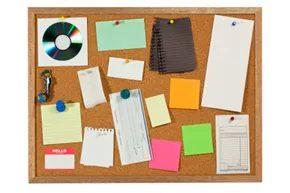
Picture a standard corkboard. The kind with the rough edges where you pin up quotes, magazine clippings, or those photos of mid-century modern furniture you swear you’ll replicate in your living room one day. Now imagine that board never fills up. Imagine your friends have their own boards, and you can see exactly what they are tacking up in real-time. You can copy their finds, save them to your collection, and access the entire archive from any device, anywhere.
This isn’t a fantasy. It is Pinterest, a platform often compared to Twitter but driven by images rather than text. For anyone who has ever bookmarked a stunning recipe or a DIY project during a late-night web dive, only to forget the URL or the specific name of the site an hour later, Pinterest offers a solution. It replaces the chaotic browser tab with a highly visual, organized gallery.
More Than Just a Digital Scrapbook
Pinterest functions as an Internet collage, but with a critical technical distinction: every image links back to its source. This creates a direct channel for information while ensuring the original creator gets credit. It is not just a place to hoard pretty pictures; it is a retrieval system for inspiration.
The platform also operates as a social community, though it is less overtly interpersonal than Facebook or Twitter. It markets itself as a hub for sharing interests and inspirations. Users can view what their connections are posting and can curate a live stream based on specific topics. This capability turns the site into a visual mass brainstorming session.
Consider redecorating. Instead of flipping through physical catalogs, you navigate to the Home Décor section. There, you find a vast array of clippings and innovative ideas aggregated from users globally. The result is a curated feed that learns your aesthetic preferences.
How to Join Pinterest
Pinterest launched in late 2009 as an invitation-only beta. By August 2012, it opened its doors to the general public, having surpassed the testing phase. In July 2012 alone, the platform attracted over 21 million unique visitors. Its growth trajectory is staggering: from fewer than 10,000 users nine months after launch in 2010, it expanded by nearly 212,000 percent.
Initially web-only, the platform now supports mobile access via iPhone, iPod Touch, iPad, and Android devices. Setting up an account is straightforward, with two primary methods:
- Email Registration : You provide an email address, create a username and password, and fill out a brief profile.
- Social Media Integration : You can link an existing Facebook or Twitter account. This requires providing login credentials for the respective platform. Be aware that this authorizes Pinterest to access specific data. For example, using Twitter allows the platform to read tweets, view follow lists, update your profile, and post on your behalf.
Once the account is created, Pinterest presents a series of images. Clicking on those that appeal to you helps the algorithm populate your “Following” page with categories you prefer.
“Pinterest isn’t just an Internet collage of cool stuff. Each image on the site links back to its place of origin, providing a simple and easily accessible channel for information as well as appropriate credit to the originators of the cool ideas.”
Building Your Network
You can expand your “Following” list by connecting with friends. By signing into Gmail, Facebook, or Yahoo, Pinterest identifies users you may know. You can also invite non-users to join.
If you do not know anyone on the platform, you can follow individual users who share your taste. When you follow someone, their pins (the term for saved items) appear in your feed. You can also follow predetermined categories. These range widely, including architecture, animals, hair and beauty, film, music, humor, weddings, history, and holidays.
Understanding how to pin content and manage your boards requires a bit of navigation. The mechanics of saving and organizing content are the next logical step in mastering the platform.
Pinterest has evolved far beyond a digital scrapbook for random images. The platform relies on a rigid internal structure to keep chaos at bay, primarily through boards. These are designated containers for your ideas. When you sign up, Pinterest hands you pre-named boards like Food, Art and Architecture, and Apparel and Accessories. You can edit these titles. If none of the defaults fit your niche, you create a board from scratch. It’s instant organization.
With your boards ready, you populate them using two distinct actions: pinning and re-pinning. They sound similar. They function differently.
How Pinning and Repinning Actually Work
Pinning is the act of bringing external content into your Pinterest ecosystem. Imagine you’re browsing the web and find snowboarding boots perfect for your winter trip. Pinterest offers a bookmarklet app, known as the Pin-It Button, to capture this. Once you install it in your browser, you click it on any page. You select the image you want to display. Pinterest automatically records the source link. Anyone who clicks that image later gets routed back to the original merchant or blog. The saved images on your boards are called pins.
Re-pinning is internal curation. You are taking an image already on Pinterest and adding it to one of your boards. Say a friend posts a recipe for bacon-infused brownies. You see it. You roll your mouse over the photo. A “re-pin” button appears. You click it. You select your board. Now that recipe is on your profile too. It’s a way to curate existing content rather than source new content.
The Social Layer and User Behavior
Pinterest isn’t just a content aggregator. It’s a social network, albeit a quiet one. Users can comment on each other’s pins. The tone ranges from casual (“Love those shoes!”) to highly practical (“I made this recipe and reduced the sugar by half.”). You can also like pins. These interactions don’t appear on your personal feed, but they facilitate communication. You access both functions by hovering over a pin.
But why does this specific interface resonate so strongly? The data from mid-2012 tells a clear story. Pinterest had grown from a startup into an Internet powerhouse. By June 2012, it was the third largest social media site globally, trailing only Facebook and Twitter. It even outperformed Twitter in engagement. Users spent an average of 89 minutes on Pinterest monthly versus Twitter’s 21 minutes.
Why Women Dominate Pinterest
The demographic split is stark. 97 percent of Pinterest’s total user base is female. Specifically, women aged 25 to 44 are the top users. This isn’t accidental.
Women gravitate toward Pinterest because it is social without being invasive. It lacks the “life story” spilling found on Facebook or Twitter. The layout is visually oriented and relaxed. It’s a passive pastime compared to text-centric sites. This behavior makes the 25-44 female demographic highly coveted by advertisers.
Businesses have capitalized on this trust. Studies show women trust Pinterest more than any other social media platform. Brands like Guess have used the site to inspire users around their brand, incentivizing re-pinning and engagement. Even without sophisticated campaigns, a basic Pinterest presence drives significant traffic to company sites. The visual nature of crafts and recipes plays into this heavily. These categories rely on visual appeal as a primary selling point.
The $7.7 Billion Business Model
Pinterest itself is free to use. So how did it reach a valuation of $7.7 billion by April 2012? It didn’t rely on intrusive ads, which are a common complaint on sites like Facebook. Instead, it leveraged affiliate marketing.
This is a standard web business model. Retailers post content on affiliate platforms to drive traffic to their own stores. The platform hosting the content receives a portion of the profits generated by that traffic. Pinterest is a perfect fit for this. It allows brands to showcase products visually. Users click through to buy. The commission flows back. It’s a clean loop. No ads cluttering the feed. Just direct commerce facilitation.
The platform works because it sits at the intersection of inspiration and action. You see something you like. You save it. You eventually click through. The money is made in that final click. It’s simple. It’s effective. And for a site built on static images, it has a surprisingly dynamic engine underneath.