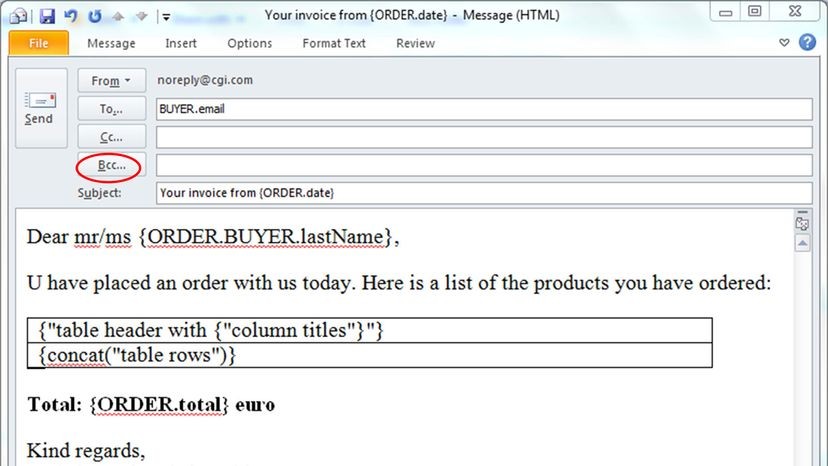
Your typical email program has several options to simultaneously message more than one person. You can load up the “To” box with many recipients and then blast away. Or you can put some (or one) in the “To” spot and CC the rest. Or else BCC some or all.
The BCC might be the trickiest as it means that not everyone is privy to the same information. And it has the biggest risk for pitfalls. So, when do you CC and when do you BCC?
First, you have to know what CC and BCC mean. The CC field stands for carbon copy; the BCC field stands for blind carbon copy. Carbon copies were common in pre-internet days. When someone needed a copy of a document, they inserted a sheet of carbon paper between two pieces of paper. The carbon paper helped the ink or type move from the top sheet to the bottom, and presto, you had two copies of the same paperwork.
What does cc mean in email? These days, an email CC means you sent a copy of a message to someone other than the direct recipient – it’s an easy way to keep vested parties in the loop on a subject. Notably, the CC format allows everyone to see each other’s email addresses, too.
BCC works the same way as CC, except the direct recipient (in the “To” line) doesn’t know that anyone was copied on the message. So, for example, if you emailed a subordinate at work about being late to the office and BCC’d your own boss to show her that you were being diligent about tardiness, your subordinate wouldn’t know that her lateness was being pointed out to your own superior.
Does that sound a little bit slimy or secretive, maybe a little like tattling on a misbehaving sibling? It should. You could call BCC the “backstabbing carbon copy,” because its usage is often loaded with etiquette pitfalls and potential backlash. After all, if you’re purposely hiding the fact that there are BCC recipients, maybe you should question your motives.
BCC is a notorious office space landmine, particularly if the person who is BCC’d accidentally hits Reply All. Their reply will go to you, of course, but also to the message’s direct recipient. Whoops. This kind of abrupt disclosure has resulted in countless tense office scenarios. The takeaway? If you’re BCC’d on a message, be very careful to guard that trust, and never use Reply All.
In spite of these issues, there are some very good reasons to use BCC. Maybe you’re a supervisor of various contract or freelance workers who never interact with each other, and you want to update all of them on policy changes without having to send individual emails. To do so, can you send them all a message with just the BCC section filled in with their addresses? Yes.
This isn’t just a matter of convenience for you – it also protects the privacy of your freelancers, who probably don’t want a bunch of virtual strangers to see their personal email address.
Or maybe you’re a company trying to contact many customers about an important issue. You absolutely have to use BCC, otherwise hundreds or thousands of people will suddenly see private email addresses. That’s a major breach of trust.
Can a BCC Recipient Be Exposed?
But what if there was a way for recipients to find out who was BCC’d on a message without the receiver’s knowledge? Not only could it lead to uncomfortable situations, but it could result in a serious violation of privacy for people who don’t want their email addresses revealed.
“Generally, recipients can’t see if someone has been blind-copied on a message,” says Sherrod DeGrippo, senior director of threat research and detection for Proofpoint Email. “Servers that receive messages are designed to strip out ‘BCC’ information before they pass the message on to the recipient. This is the case for all recipients, including those in the ‘To,’ ‘CC,’ and ‘BCC’ lines.”
But as with all things digital, that’s not the end of the story. Typically, it’s user error that causes BCC privacy breaches.
“The most common way is for someone to figure out blind-copied email addresses is when the sender accidently puts people meant to be in the ‘BCC’ line in the ‘CC’ line,” says DeGrippo.
However, she notes that threat actors – hackers – have found ways to attack the privacy of BCC. One would be to access the target’s inbox in one way or another, and then simply look in the Sent items to find out who received a BCC message. Or, if your device is infected with data-stealing malware, an attacker could access messages in the Sent folder.
“Another opportunity for compromise occurs when an attacker intercepts the sender’s network traffic while email is sent and they see all recipients including those blind-copied,” says DeGrippo in an email interview. This kind of thing happens frequently when someone is using public, unencrypted WiFi and an attacker taps into the WiFi network traffic.
“And finally, if an attacker has compromised the email servers of the sender or any of the recipients (including the ‘To,’ ‘CC’ and ‘BCC’ recipients) or intercepts the network traffic between these servers they can also see all recipients,” says DeGrippo.
In other words, BCC is anything but impenetrable. So, if you’re a spy trading in state secrets, you’ve been warned.
Double-check your recipient list. It sounds obvious, but most email fiascoes start with a single typo or a confused hand placing an address in CC instead of BCC. One slip and your entire contact list is exposed to everyone else on the thread.
Update your security software. Regularly.
If you aren’t keeping your anti-virus and security patches current, you’re leaving the door open. Current threats move fast. Static defenses don’t work.
“Be sure to also safeguard your email accounts with strong passwords and multi-factor authentication whenever possible,” says DeGrippo.
Don’t skip the MFA. It’s the cheapest insurance you can buy.
Public WiFi is a trap. Avoid it. If you must use it, use a VPN. The encryption layer keeps your data from being sniffed by the next person on the same network. Without it, you’re broadcasting your inbox in plain text.
How BCC Protects Your Email Privacy
BCC stands for blind carbon copy. CC is carbon copy. The difference is visibility. When you use CC, everyone sees everyone. When you use BCC, recipients are blind to the rest of the list.
You can send a mass email without showing addresses. Add them to the BCC field. Not CC. The distinction matters. If you put them in CC, you’ve failed the privacy test.
Recipients cannot see who else received the email. They read the message. They reply. But they never know if there are fifty other people in the dark with them. Only the sender knows the full list. You can always check your sent folder to see who was BCC’d. But they can’t check yours.
Replying to Mass Emails Without a Mess
How do you reply to multiple recipients? Click “Reply all.”
This is useful when you want your response visible to everyone. Not just the sender. But be careful. Replying all to a BCC’d email often causes chaos. The original recipients might get a message they didn’t expect. The BCC recipients might get a message that reveals their hidden status.
Do BCC recipients see each other? No. They see the sender. They see the content. They do not see the other BCC’d addresses. The sender is the only one who holds the full map of the conversation.
Beyond Email: Texting and Mass Messaging
BCC isn’t just for email anymore. It works via texting too.
Send one message to many people. Receive individual replies that come only to you. This mimics the BCC behavior of email but in a SMS or messaging context. Apps like Hit Em Up let you perform this task with ease. It’s free.
This is useful for community announcements. Or for coordinating groups where privacy matters. You don’t want your phone number handed out to strangers. Hit Em Up keeps your number hidden while letting you manage the replies.
BCC Email FAQ
What is BCC in an email?
Blind carbon copy. Recipients cannot see who else has received the email. CC is carbon copy. Everyone sees everyone.
Can you send out a mass email without showing all recipients?
Yes. Hide names and addresses by adding recipients as BCC. Not CC. The easiest way to maintain privacy.
Can you find out if someone was BCC’d on an email?
Recipients cannot know. They have no visibility into the hidden list. The sender can always check the sent folder to see who was BCC’d.
How do you reply to multiple recipients?
Click “Reply all.” This makes your response visible to everyone added to the email. Not just the sender.
Do BCC recipients see each other?
No. They read the email. They don’t see who else received it. Only the